Sunday, August 5, 2012

Review - the UAD Apollo Duo

UAD Apollo under laptop with heaps of UAD plug-ins showing
It's no secret I've been a fan of UAD since I purchased the little UAD-2 Solo/Laptop card. Since the Solo has only one of the SHARC plug-in processing chips in it, my plug-in demands quickly overloaded it. This was usually accompanied by the fiddly and annoying juggling of said plug-ins and bouncing or freezing of tracks in Logic.

So when UAD's Apollo emerged as their new flagship product, I was excited (and after 25-odd years in the music industry, I don't get excited by much anymore). Not only did the Apollo come with some reputedly rather nice preamps, it contained either a Duo or Quad SHARC chipset for running UAD's rather tasty plug-ins as well. Even better, you could have some of those UAD plug-ins in between those preamps and your DAW. This means you could have the virtual equivalent of a very expensive vintage tracking chain of effects with a usefully-low recording latency. That's pretty damn cool.

So I managed to get my hands on an Apollo Duo for a try-out (Thanks Leon at NZ Rockshop!) since all the Quads sold out instantly in NZ on hitting the shores.


A big potential selling point for me was that the Apollo is supposed to be able to be fitted with Intel's new Thunderbolt interface. (More here) This involves purchasing an extra add-on card which hasn't been released yet at the time of publishing, but I really look forward to checking out the performance when these become available. The Thunderbolt transfer speeds are supposed to be blisteringly-fast - actually similar to connecting directly to the PCI-express port on your computer (and there's two channels of that per Thunderbolt port). This means even lower latencies between the interface and the computer, with none of the Firewire-bus wrangling. This is really only an issue anyway if you have external Firewire drives daisy-chained to the Apollo.

UAD have a solid reputation in the audio industry - they make great "vintage"- quality hardware, and have also pretty much nailed the "accurately-modelled vintage studio hardware" DAW plug-in market. I have found the UAD version of classic vintage units such as the Pultec and LA-2A to be several steps above other versions I have tried. They model each component of prized representative units of vintage hardware to capture all the non-linearity that made the originals so musical and desirable. Then they add any extra handy functions to make them slightly more usable in modern DAW production.

As you can imagine, all this extremely detailed modelling takes a ridiculous amount of extra processing power - hence needing some heavy-duty plug-in engines to do all the hard work. This is why UAD plug-ins only run in UAD hardware (and no doubt also for copy-protection reasons). Although you can buy duo or quad-chipped UAD Firewire and internal PCIe units, the Apollo conveniently includes the chips in this tasty preamp/audio interface unit.

Apollo Front Panel
The build on these units is solid. They are only one rack unit high, but are quite long.  They are well-perforated for good ventilation, and the finish is impeccable. Simple front panel controls make operation easy, and probably help keep the cost down. Large gain and output volume knobs have an LED ring around them to indicate current level, and each has a push-switch included. For the gain knob, this selects between the four microphone preamps, and for the master volume knob, it is also a mute control.
Power is supplied through a fairly chunky external power pack that handles the various international voltages.

Apollo Rear Panel
Despite all the digital gear packed around it, the analogue side remains completely silent and clear.


The Burr-Brown preamps are very nice - high gain, quiet and very transparent. Luckily you can insert some UAD plug-ins between the preamps and the DAW inputs to colour this sound should you wish.

In fact, as I hinted at earlier, this is one of the other major selling points of this unit - the ability to put a chain of UAD plugins in between your microphone, guitar or bass and the input of your DAW. For those of us that like to commit immediately to a particular sound, and can't afford the luxury of racks of vintage analog gear, this is a godsend. Of course this is only useful if the recording latency is low enough to be usable, and in this case it is - only a couple of milliseconds in total. Saying that - there was still a little wrangling of monitor sources in the DAW to avoid the ol' comb-filtering effect of two sources with different latencies.

I look forward to seeing what the recording latency is like in the Thunderbolt-interface version of the unit when it becomes available. It means bringing it down to latencies that are very close to using the old Pro Tools HD hardware - less than 1 millisecond. That's pretty darn good.

Okay, so far everything looks pretty good - there's not much to fault in this unit really.

I would say that the only niggles are in the software/firmware.

My first issue was with the combination of the Apollo and my old UAD-2 Solo/Laptop card. Since my trial Apollo unit was only a Duo, I thought, "ah, I've still got my little Solo/Laptop card as well, so that's three processors - not too far off four".
While this was true in theory - it didn't immediately work in practice. I discovered there are some "quirks" with laptop cards. Cardslots in general have always been a little quirky - although in theory it's fine to hot-plug certain devices into the guts of a computer while it's running (and the Solo/Laptop by itself usually seemed to handle it okay) - it's really pushing the technology/software/OS towards their limits. I found that with the combination of the two devices, I was getting some UAD plug-in overload messages opening up old Logic sessions with UAD plugs inserted.

Anyway - the friendly and patient support guy at Universal Audio helped me troubleshoot it on the phone, and it turns out that as long as the Solo/Laptop card is plugged-in before booting up the laptop (so it shows up first in the hardware list in the UAD Control Panel), and then the Apollo is plugged in/turned on afterwards, everything works just dandy. Any loaded UAD plug-ins in the session are now distributed over all the available SHARC chips. Sorted.


Another minor annoyance I found was with the implementation of the plug-ins within the Console app - you can't drag and drop the plug-ins into a different order - you have to cut and paste etc. A bit fiddly when you're wearing a guitar and trying to quickly get something tracked while the idea's hot.

The Console plug-in is modelled on an analog console, with its own built-in effects sends and returns and headphone sends. It allows some nice low-latency patching of monitoring effects like reverb and delay, but it doesn't include the more obvious ability to patch any input to any output like most audio interface mixer apps. This is offset somewhat by each of the various ins/outs within the Console app showing up in your DAW as ins/outs, but is not what you would call "conventional" or transparent operation. Especially if trying to set up multiple headphone sends, each with a different mix.

There's no beat-clock for UAD effects that depend on session tempo either - I can see why this is difficult to include as the Console app sits external to your DAW session - but perhaps having the facility to accept MIDI clock via a virtual MIDI port would be valuable. (UAD boffins - maybe this could be implemented via the Console plug-in?) Having beat-synced delays is important whilst tracking to a song with delay-based effects.
I'd also like to see the ability to map MIDI controllers to various Console parameters/UAD plug-in parameters.

It's not all niggles though - there's a handy plug-in version of the Console for remembering the settings as part of your project - nice! And the Console app allows the easy copy/pasting of your channel mix settings to your effects/headphone sends - very handy!


Review of features

Sound quality; I couldn't fault it. This is a very nice unit. Very low noise and no obvious colouration in the mic preamps. Plenty of gain. Full 48 V Phantom power for mics. Pad, low cut and phase switches. All controlled by a fancy rotating knob with surrounding lit ring showing current gain, and some selector buttons.


I tried recording and playback at various sample rates up to 192kHz. I didn't find that much difference between them really. Just correspondingly lower latency and perhaps a touch more "silkiness" on some instruments in the higher frequencies. I'm guessing the Apollo oversamples for the lower sample rates anyway, so there's not much in it. (And some of the UAD plug-ins themselves are upsampled as well).

I tried recording some acoustic guitar - first without any UAD plug-ins inserted - the preamps sounded open and clean-sounding. Very transparent and very low noise. About what I expected from UAD. Very nice.

I then tried inserting some plug-ins into the Console app that comes with the Apollo.

UAD Apollo Console App


Some gentle compression with the 1176SE, Pultec adding small amount of top, and LA3A as peak limiter. Beautiful - now the guitar was sounding shiny and firm, with no nasty artifacts, and no noticeable noise problems despite the compression.
I had to pull the fader down in Logic and just monitor through the UAD console app to avoid the latency-induced comb-filtering.

Next I thought I'd try one of the High-impedance instrument inputs on the Apollo's front panel. The input automatically switches from Mic/Line to Instrument when you plug in. Handy. Oh - and it sounds really good. I'm not suprised - UA has an excellent reputation with not only audio quality, but also pro-level usability design.
As I'm guilty of pretty much always just plugging my Fender Jag-Stang straight into my interface to capture ideas as fast as possible - I could tell that this immediately sounded better than my old interface ever did. A LOT better. Winding the gain knob up gave a really nice creamy analogue distortion too. I'm really liking this unit so far. Clean on mic inputs, nicely coloured analogue on the Hi-Z inputs.

Let's try the dodgy acoustic guitar piezo bridge pickup. Plugging straight into the Hi-Z jack. Wow - same thing again. A huge improvement - in fact the best I've heard it sound from the pickup. It's normally quite clicky and overly percussive. This sounds much smoother and fatter.

And my Jaguar bass sounds great plugged straight into the Hi-Z input as well - as much as I love my old Drawmer 1960 tube preamp on bass, I have much more control with the Apollo.

So - it seems like we're getting 4 very good quality mic preamps with this unit. The mic inputs can be switched to the line inputs on the back, with the first two inputs automatically switching to Instrument when something is plugged into the Hi-Z jacks in the front.
There's also the usual S/PDIF I/O (with auto sample rate conversion if you like), and an S-Muxed dual ADAT I/O that can do either 8 channels of regular 44.1 or 48kHz sample rates or handle up to 4 channels of 192kHz audio.
There's two headphone outputs that can be fed from various parts of the Console app.


The controls are simple and clear - each of the four preamp inputs can be selected by pressing the gain knob, and rotating to set amount of gain. A circular light ring surrounding the gain pot shows the amount of gain added. Switches apply 48v Phantom Power, Pad, high-pass filter etc to the selected channel.

The Console app shows much more detail, reading out in decibels and showing the state of everything all at once. It has its own built-in headphone busses and effects monitoring setup.
Because this is a digitally-controlled preamp, all settings may be saved and recalled - as I mentioned, there is a Console plug-in (in all the typical plug-in formats) that can be inserted into the session that can recall all these settings automatically if you like.

Conclusion

A great unit overall. Sounds fantastic and is, without doubt, value for money - especially the Quad version.
Not quite perfect yet - there's still a few very minor things to iron out with the interface software, and the Thunderbolt adaptor is still absent (as at July 2012).

For this price (about USD$2,500 or just under NZD$4,000), the question is why woudn't you buy one.
I did.


ps. I forgot to mention, for those of you who know little about UAD yet; like most of their plug-in based devices, the Apollo comes standard with the UAD-2 Analog Classics plugins collection (the 1176LN, LA-2A and PultecEQP-1A) and a voucher for $100 worth of plugins.
That's pretty cool value - especially if you wait until one of their fairly regular online sales to use it.

Plus - when you install your plug-ins, it installs every UAD plug-in, and the others (that you haven't purchased yet) can be demoed for two weeks from whenever you click the little "demo" button on the plug-in. I've also noticed that all the demos seem to be reset every time you purchase a new plug-in. These guys are very canny yet professional with their marketing, and they certainly know how to look after their customers.

Monday, May 21, 2012

8 Top Logic Pro 9 Features

Bounce Track in Place


Here's 8 of my top features in Logic pro 9. If you have any others - feel free to comment!
Click on the pictures for larger versions.


8 Bounce-in-place, for either track or region. Bounces down either your audio instrument MIDI regions or your audio regions - with or without plugins - to new audio regions and then mutes the original track or region. Great for rapidly "printing" any special processing or pitch-fixing plug-ins like Melodyne into a solid file. Note you can also do this for EVERY track simultaneously should you wish to export all your tracks into a different DAW program for mixing or something. Closely related to...


Freeze Track - the Two Modes
7 Freeze Track - you can freeze a track either just after the instrument (or less-usefully after an audio file I suppose), or after all the plug-ins and the fader, depending on how much load you want to take off the processor and how much control you want over tweaking plug-ins. Basically it does a cunning invisible 32-bit float bounce of the track (which you can go and copy from its folder if necessary) and then disables plug-ins/instruments on that track - in other words swapping processor power for hard-disk speed. It still sounds exactly the same but now you have more CPU power to do stuff. You can still un-tick the freeze button at any time to do some editing etc. Essential when you inevitably have so many plug-ins and instruments in your project that it won't play!


Replacing or Layering Drum Track
6 Replace or layer individual drum tracks - need to fix up or bolster those poorly-recorded kicks, snares or toms? Logic can automatically detect the drum hits on an audio track (you can adjust sensitivity), then you can choose a replacement (or layered) drum sample which is then automatically imported into a new EXS24 sampler which is placed underneath the original track with a handy MIDI trigger region to play it.


Convert Audio Region to Sampler
5 Convert to sampler - this is cool and ridiculously easy. You can either select a strip-silenced bunch of audio regions on a track, or you can let Logic identify the transients in the audio region/s, then it will automatically pack all those audio chunks into a sampler assigned to MIDI notes ready to play. And then mute the original audio regions. Oh, and it conveniently creates a MIDI region that plays those samples exactly as if they were still the original audio files - so it recreates the source audio exactly. You can delete this if you want to do something different.


Select Sampler Options


Final Converted Sampler Track with MIDI region


Making Groove Template from MIDI Region
 4 Create your own grooves, or match your MIDI stuff to live drums. You can do this in a few ways - using the "Audio-to-MIDI" groove template under "Factory" in the Sample Editor window, or recording a MIDI track while you tap along with every 8th or 16th note on a MIDI keyboard, or use the drum/replacement doubling trick above. Once you have a MIDI file, select it and go to the region inspector pane, click on the "Quantize" drop-down menu and select "Make Groove Template". This can then be applied to any other MIDI or Audio regions.


Audio to MIDI Groove Template


Region Gain

3 Region Gain - many users of Logic still don't know you can use the little region inspector panel top left of the Arrange window to adjust the individual gain for each audio region.  It can replace the use of automation in some cases - just cut up your regions and set the gain for each one. It handily does this before it goes through any plug-ins in the channel strip (although this can be a problem if you have compressors inserted and you're trying to use it instead of automation - the compressor may "fight" any gain changes).


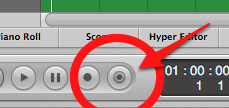
Capture Record Button
2 Capture Record. This mysterious little button is like magic. Say you're just been jamming along on your MIDI keyboard or controller in Logic, then you realise you've just played something absolutely amazing, but "oh no!" you haven't been recording!

Fear not, just press this little button and what you just played will magically appear as recorded. If the button doesn't show up for you - Ctrl-Click on your Transport bar and add it.

Tip - use "Take Folder" mode for your MIDI cycle recording - even more useful.

NB: This doesn't work with audio unfortunately - unless you use the sneaky "Punch-on-the-fly" mode trick. When "Punch on the Fly" mode is selected under the Audio menu, Logic is ALWAYS recording any armed audio tracks whilst playing-back. You just need to actually hit "record" for a second while it's still playing to let Logic know you want to capture and hence retrospectively grab what you just played.


Take Folder

1 Take Folders. Most people know about this one but it still bears mentioning. Record while in cycle mode, then just swipe the bits you want to keep from each take. It's a fantastic way to get great vocal takes and Apple really has this one nailed better than the competitors. Many people aren't aware of all of its cool features though.

Some additional tricks are; creating alternate versions of your comp (good for backing vocals or doubling lead vocals), exporting particular comps to duplicate tracks, editing the audio itself (eg trimming or moving parts) while comp'ing a good take, tagging the best bits as you go, or editing the size of the looped section (and folder) if it chops off the beginning of the loop each time.
You can also manually create a take folder out of various selected audio regions for creative purposes and you can also cut the take folder into chunks if needed.

What are your favourites?

Thursday, December 15, 2011

Zed's Digital Audio Top 10 of 2011


Window
Uploaded with Skitch!


This list is made up of those plug-ins and digital apps I used the most this year and/or made me the most excited. Most are available for both PC and Mac, and only a few are still stuck in 32-bit mode - hopefully that will change soon.

10) Izotope Ozone 5. Link This is the Mastering app of choice for most semi-pro engineer/producers and a great update to the ubiquitous Ozone 4 multi-processor - albeit slightly expensive for the "Pro" version without the introductory discount. The Pro version allows you to insert each module as a separate plug-in if you so desire, and has awesome audio visualisation options (plus a few extra features per module). Within this plug-in you get all the essential tools to repair a finished mix - a mastering limiter (Maximizer),  multi-band compression, multi-band exciter, multi-band width controls (Imager), mastering reverb, and an awesome EQ with handy frequency "solo" for ease of locating those crazy out of control frequencies. Oh, and you can go stereo or mid-side depending on your needs, and you also get all sorts of dithering and metering options.

9) SoundIron Emotional Piano 2. Link It's amazing how often you need a piano in a mix, and because I don't have access to real one, I'm always struggling to find one that sits nicely in a song, especially as the ubiquitous grand pianos that seem to come with various packages don't always work with the track. This piano is meant to be more "soundtrack-ey", it's warm, has character, and seems to sit much better than any of the others. If I want a clean sound I use Modart's Pianoteq Link - a very nice modelled piano.

8) Avid Pro Tools 10. Link Just so you know, although I'm a Logic Pro afficianado, I'm also a trained Pro Tools user and it's good to see Pro Tools coming along so well and, although they've had the studio-recording side totally nailed for so long (and are the industry-standard for recording in the studio), they are still catching up somewhat with everyone else in the compositional features stakes. Also - now you don't need to have a piece of Avid hardware to run it, it simplifies (and cheapens) your setup. Still a bit overpriced (especially as you have to pay quite a bit extra for much of the really cool stuff), but if you want to work with a variety of studios, you will probably need to use it at some point.

7) Arts Acoustic Reverb. Link This algorithmic reverb is not only easy on the CPU, it sounds fantastic. I think our love-affair with the impulse reverb is fading, because as good as they initially sound, they are inherently linear - the sound doesn't change based on level going in, so they can end up being a bit sterile. I think of them as "precision reverbs". The Arts Acoustic can still sound clean, but you can get some pretty twisted sounds out of it if you need to, or some gorgeous Lexicon-like warmth. I use it a lot for dark and twisted drum reverbs, and for clean and open vocal reverb.

6) Logic Pro 9. Link Notice it's not at number 1, because as much as it's my main tool in the studio, and it IS pretty damn awesome, (and ridiculously good value for money BTW - especially as you can now buy it on App Store for $200 USD) Apple have let it sit in the background for a while now, with very few updates, and some bugs that have been there for several years. I'm hoping that they release version 10 soon, without destroying what makes it so good - like they almost did with Final Cut Pro X. Runners up - Ableton Live Link - you'd have to have your head in the sand not to notice this DAW (Digital Audio Workstation) app increasingly dominating the market - although mostly in DJ, electronica and live performance realms, and Reaper Link - an inexpensive and increasingly fully-featured application that's really taking off.

5) SoundToys Devil-Loc Deluxe. Link Actually the entire Sound Toys native bundle is also fantastic (and pretty well priced if you're a student and can get the Academic pricing), but I've found this particular compression-with-distortion plug-in an essential for big fat drum sounds. You can get it pumping in a really good way, and it sure adds instant excitement to the drum mix.

4) D16 Group Toraverb. Link This plug-in reverb can get the biggest, widest, lushest chorused reverb sounds ever. It's very impressive, and once you hear it, you'll want it. I use it every time I need a huge sense of space and distance on something in my mix. Actually the D-16 Group do some fantastic plug-ins - I have the rest of the Silverline collection and also use the Decimort (which can emulate the colouration from various older samplers) and Devastator (a multi-band distortion unit) plug-ins a lot.

3) Slate Digital VCC (Virtual Console Collection). Link The idea with this plugin is that you put it on every channel strip and/or the busses to simulate one of four (now five!) analogue mixing consoles. It's very subtle per channel strip, but somehow adds up to making a mix sound great and just "gel". Runner-up to this is the very affordable Sonimus Satson Buss Link.

2) Celemony Melodyne Editor 2. Link When it comes time to transparently fix poor intonation in vocals, without the obvious side-effects that you might want for some styles of music, then Melodyne is the one. It retains the nuances of phrasing and vibrato, and allows you to just fix the gross pitch errors if you like, or you can still go more extreme if you really want to. Also great for matching and creating backing vocal lines, repairing guitar tracks (got one string out of tune?) as it can now do polyphonic tracks, and my favourite; fixing poorly-played bass lines, because you can quantize to a time grid as well as fixing poor intonation on cheap basses. There are a bunch of products that Celemony put out, including the multi-track Melodyne Studio, but I like this one as it's a pretty full-featured plug-in that can also do Rewire. An absolute essential!

1) Anything by UAD. Link This was my big "Eureka" moment this year. I decided to buy the UAD-2 Solo Laptop card to get some more processing into my overstressed Mac Book Pro laptop. Here's what I found - the UAD plug-ins sound so much better than any other versions of the same plug-in, and sound so very close to the real hardware units that they're modelling. You don't need "golden ears" to tell the difference either. It might have something to do with the way the plug-ins are up-sampled for processing, or it might be the ridiculous huge amount of detailed modelling that they've done to recreate the vintage equipment so realistically. My favourites so far are the good old Pultec EQ - it really does just make things sound better - even without adding any EQ (although you probably will), the Ampex ATR-102 reel-to-reel, the Fatso Jr/Sr for, well, fatness, and the SPL Vitalizer for adding character to synths. My credit card is still hurting from going a wee bit crazy on these plug-ins this year, but I don't regret it.

Notable mentions: the free Michael Norris effects collection Link for some quite radical granular processing options - especially useful for sound design. Some of the cool Waves plugins Link; for example the Kramer MPX reel-to-reel tape recorder and the Vocal Rider Not cheap, but good. Xfer Records' LFOTool Link - adds tweakable sync'ed modulation to just about anything. Great for locking-in, enhancing or creating grooves in any track. Izotope's Stutter Edit Link - awesome for adding those extra crazy head-sounds to your mix and for creating some extra action when it gets too boring - and you can play it in from a MIDI keyboard. The Sonnox collection Link - every single plug-in is useful and just sound awesome. And they've dropped the prices so real people can now almost afford them. Cytomic's "The Glue" Link - a really excellent analogue-modelled master bus processor that you just set and forget.